Friday, September 28, 2007

Best of Open Source in Platforms and Middleware

Being a software developer, I have truly begun to appreciate the benefits that my organization receives from Open Source software. This is especially true of middleware which consists of the meat of our IT infrastructure. Right from our Java EE application servers to our Web Services stack, the choice and quality of middleware available is truly phenomenal.

Infoworld recently announced the 2007 BOSSIE Awards for the Best of open source in platforms and middleware. I was glad to see JBoss and MySQL picking up awards - two products that I use every single day.

Sunday, September 09, 2007

Project Blackbox

Project Blackbox was launched around a year ago by Sun Microsystems. It is promoted as a mobile data center built into a 20' shipping container. The goal behind Project Blackbox is to provide a significantly powerful and capable data center that can be easily configured and deployed to varied and extreme locations. It is an interesting product and can be seen to fit into a number of scenarios where a traditional brick-and-mortar data center would not be feasible.

The Project Blackbox website has interesting information on the product. The video of the Earthquake Test of magnitude 6.7 is particularly impressive. I hope to soon spot black shipping containers with the Sun logo on rooftops all over our city.

Sunday, August 12, 2007

Memory Monitoring on Security Now

Security Now is a weekly podcast that focuses on the topic of computer security. I am a regular listener to the show and received a rather pleasant surprise to find a question that I had posted to the podcast being discussed.

I often like to track usage of memory (RAM) on my Windows machine. The tool that I usually use is the built-in Process List monitor (activated using Ctrl-Alt-Del). However, I was wondering if there was a more user-friendly app, possibly with a graphical view displaying memory usage by applications and processes. Hence I posted the question to Security Now. Below is the transcript of the question being discussed by Steve Gibson and Leo Laporte on Security Now Episode 104.

...

LEO: That’s the problem is that it’s all, you know, it’s international. You know, it’s tough because we’re an international podcast. For instance, Vijay Albuquerque in London - or it could be Vijay London in Albuquerque, doesn’t matter - now has plenty of room on his drive. He says: Dear Steve and Leo, after hearing about SpaceMonger, which by the way, Steve, I’ve been recommending everywhere, the original free version...

STEVE: Yup, it’s so nice.

LEO: I just recommended it on the radio show last weekend. He says: I’ve reclaimed virtually gigabytes of data from my hard drive. It gives you a visual display of what’s wasting space on your hard drive, makes it easier to get rid of it. He says: Is there something for memory, for RAM? He’s using the process monitor. You hit Ctrl-Alt-Del to get the Task Manager, and then you can click Processes and see the list of processes. But there must be a simpler, friendlier tool out there, something like SpaceMonger for RAM. I like it.

STEVE: RAM Monger or something, yeah. Well, it was an interesting question, so I wanted to explain that, you know, RAM is an entirely different animal than hard drive space because it is inherently dynamic. So applications which are running will use differing amounts of RAM, but there’s really no way to tell an application to stop using that much memory unless it’s a sloppy application that, for example, you could have a photo editing program where you edit a big photo which takes up a whole bunch of memory, and then when you close that photo it doesn’t release the memory, for example. So it’s possible that you could have apps which are misbehaving and essentially leaking memory.

But thankfully all Windows versions for the last decade have cleaned up the so-called "resource leaks" when the application terminates and freed up anything, any resources that they had allocated. So really just terminating processes, if you can, that is, if you don’t need them around, that are using up a lot of memory, will release their memory. But there isn’t anything that you could run to really clean up memory. There are some sort of hokey programs that are supposed to optimize your RAM. But they’ve really got a bad reputation. And really just, if you have this problem, just restarting Windows and getting things going again is the way to clear everything out.

LEO: In the old days of Windows 95, 98, and ME, the memory manager was pretty pathetic, and so you would have fragmentation of RAM, and you’d have some issues. But XP’s memory manager is fine, and there’s no point in compacting RAM.

STEVE: Right, right.

LEO: I think the memory manager does a pretty good job of getting rid of unused blocks. It can’t solve a memory leak, but nothing can solve it. If the operating system won’t get rid of that block, you know, release the block, no program’s going to come along and do it. So...

STEVE: Right.

...

Tuesday, July 24, 2007

Lambda Probe - Manage Tomcat with Simplicity

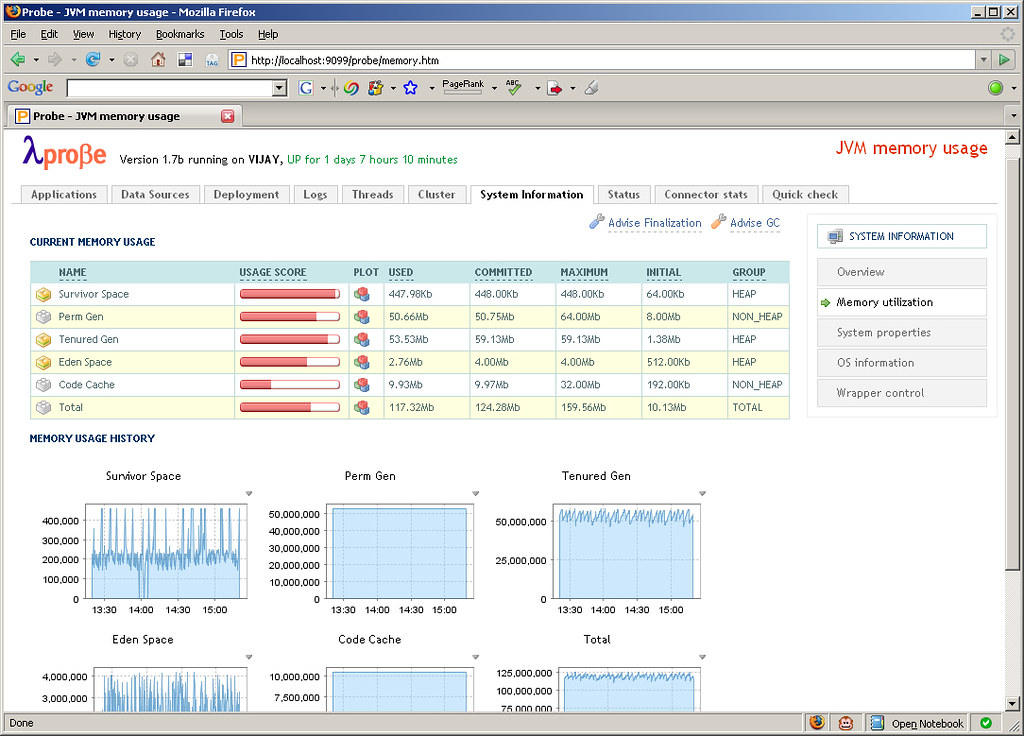
Apache Tomcat is arguably the most popular servlet container in use today. It has a well-established user base and is usually one of the first to implement new Servlet and JSP JSR specifications. Tomcat comes bundled with the Manager App that allows to perform management tasks such as deployment, reloading etc. of webapps and other related services. The Manager App also provides an interface for integration with Ant and in the future there are plans to also provide a web service interface. The browser-based interface is functional but seems a little lacking especially for monitoring the Tomcat and JVM runtime. This space has been neatly filled by an open source project called Lambda Probe. Lambda Probe installs as just another web application under Tomcat and provides a clean, simple visual interface for core administration and monitoring.

Along with performing the usual tasks such as listing, deploying, reloading and un-deploying webapps, Lambda Probe provides comprehensive system monitoring information, JMX integration to monitor memory usage, connector stats for HTTP requests made and clustering information. Another useful feature is browsing the Tomcat log files which can be tailed in real time. Lambda Probe also provides an Availability Quick Check. Quick check is an instant way of checking the availability of the Tomcat server against three primary parameters: data source availability, free memory availability and file creation capability.

Thursday, June 14, 2007

Displaying Javadocs in Subversion

Javadocs are an essential component of any Java project. It is a convenient way for a developer to gain an understanding of the API and the prescribed ways to use it. This is especially true when hosting open source projects on Google Code or Sourceforge. Subversion is increasingly used as a revision control system to host source code and other project related artifacts. Google Code uses Subversion exclusively while Sourceforge provides it as an option. At times, for the convenience of hosting and to centralize resources it may be required to host the Javadocs in Subversion and access them via a browser. When using Eclipse as the IDE, connecting to a Subversion server is simple through the Subclipse plugin.

On successfully committing the Javadocs to the server and viewing the exported pages through a browser, we notice that the pages display in text and are not rendered as normal HTML pages by the browser (Screenshot). The reason behind this is that the MIME type for the pages is set to text/plain and must be changed to text/html. This can be achieved through the Eclipse UI by applying the MIME type to the svn:mime-type property on the root directory of the Javadocs. The Set property recursively option must be checked to ensure that all the pages under subdirectories are also updated with the correct type.

The last change is to update the MIME type of stylesheet.css to text/css. The Javadocs in Subversion can now be viewed successfully through a browser (Screenshot).

Tuesday, June 05, 2007

URLPing - A Java Utility to Ping a URL

Recently there was a need at work to programmatically check the status of a URL. The requirement was to test if a specified URL returned a HTTP Status Code 200 OK or otherwise. URLPing, the utility that I wrote has been hosted on Google Code and is available for download and reuse. The utility uses the Apache Jakarta Commons HttpClient component.

URLPing is the main class. This class provides two methods ping(String url) and ping(String url, int timeout). The first method accepts a URL to ping and defaults to a timeout of 30 seconds. The second method accepts a timeout interval in seconds in addition to the URL to ping.

URLPing urlPing = new URLPing();
PingResponse pingResponse = urlPing.ping("http://www.techvj.com");
        
assertEquals(pingResponse.getResponseStatus(), ResponseStatus.OKAY);

The response to the ping method is a PingReponse object. This contains a ResponseStatus enum with values of either OKAY, ERROR or TIMEOUT depending on the outcome of the ping. It also contains a responseCode property which contains the response code of the HTTP request.

Google Calendar Error Page

Don't come across Google products crashing very often, however this morning my Google Calendar instance crashed with a 'Server Error'. Well, Google Calendar is still in Beta and this is the first time it has crashed on me. I found the error page very interesting. It contained the same error message in 18 languages! Now that denotes an app with true internationalization...