Showing posts with label Tomcat. Show all posts

Tuesday, July 24, 2007

Lambda Probe - Manage Tomcat with Simplicity

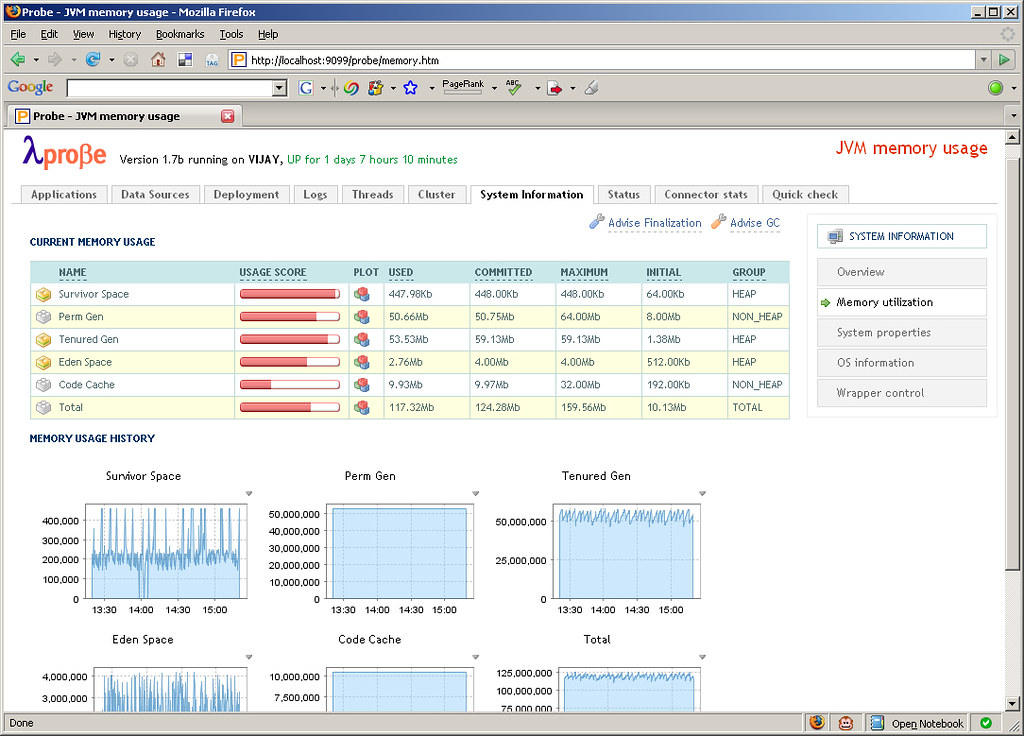
Apache Tomcat is arguably the most popular servlet container in use today. It has a well-established user base and is usually one of the first to implement new Servlet and JSP JSR specifications. Tomcat comes bundled with the Manager App that allows to perform management tasks such as deployment, reloading etc. of webapps and other related services. The Manager App also provides an interface for integration with Ant and in the future there are plans to also provide a web service interface. The browser-based interface is functional but seems a little lacking especially for monitoring the Tomcat and JVM runtime. This space has been neatly filled by an open source project called Lambda Probe. Lambda Probe installs as just another web application under Tomcat and provides a clean, simple visual interface for core administration and monitoring.

Along with performing the usual tasks such as listing, deploying, reloading and un-deploying webapps, Lambda Probe provides comprehensive system monitoring information, JMX integration to monitor memory usage, connector stats for HTTP requests made and clustering information. Another useful feature is browsing the Tomcat log files which can be tailed in real time. Lambda Probe also provides an Availability Quick Check. Quick check is an instant way of checking the availability of the Tomcat server against three primary parameters: data source availability, free memory availability and file creation capability.
Thursday, April 12, 2007

Loading Log4j Properties in Webapps on Tomcat

Log4j is a well established and widely used logging framework for the Java platform. At the core of Log4j lies a configuration file that allows to finely configure the logging requirements for an application. Currently, the configuration file is either a XML or Java properties file. The documentation states that this configuration file should be present in the classpath of the application. This works fine for most situations however causes problems within webapps on Tomcat.

The Log4j FAQ describes this due the way in which JavaEE and Servlet containers utilize Java's class loading system.

The problem can be overcome by using Log4j's PropertyConfigurator. PropertyConfigurator enables to statically load the configuration from an external file. Using the configure(String configFilename) method we can manually specify the path to the properties file within the webapp. We can tie this code into a ServletContextListener's contextInitialized(ServletContextEvent sce) event to force the properties file to be loaded at webapp startup.
Our ServletContextListener implementation is listed below:

import javax.servlet.ServletContextEvent;
import javax.servlet.ServletContextListener;
import org.apache.log4j.PropertyConfigurator;

public class ServletContextListenerImpl implements ServletContextListener {
    public void contextDestroyed(ServletContextEvent sce) {

    }

    public void contextInitialized(ServletContextEvent sce) {
        String path="WEB-INF/classes/log4j.properties";
        ServletContext context = sce.getServletContext();
        PropertyConfigurator.configure(context.getRealPath(path));
    }
}

Our Log4j properties file should now be successfully loaded when the webapp is initialized.