Showing posts with label Eclipse. Show all posts

Wednesday, March 19, 2008

Wicked Shell for Eclipse

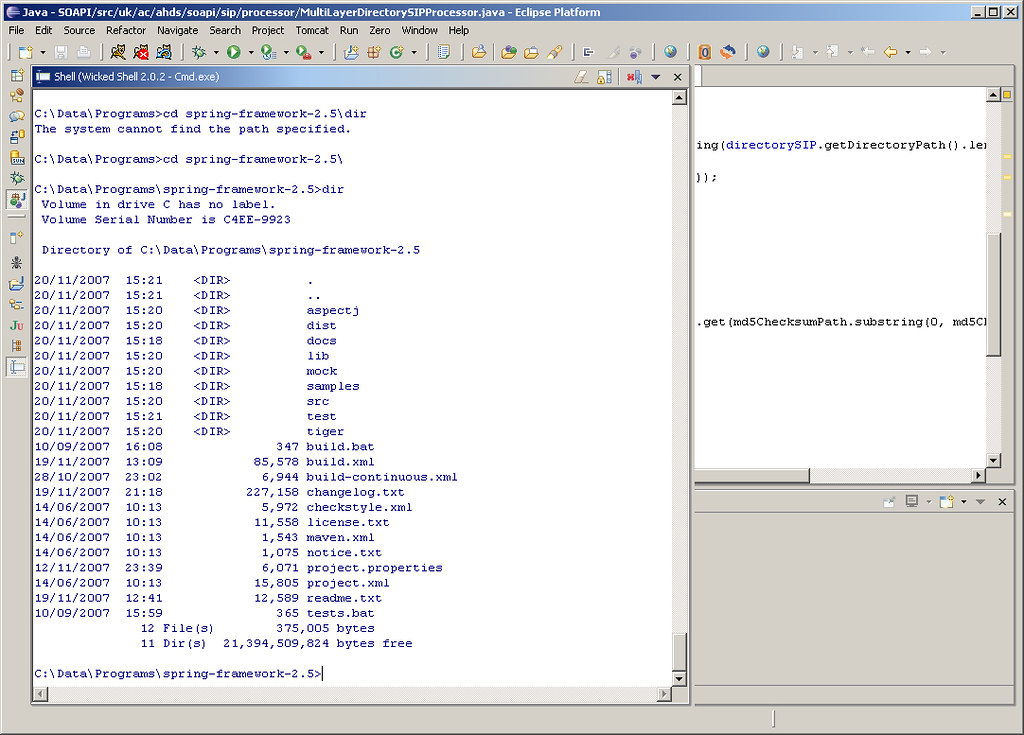
An Eclipse plug-in that I have begun to regularly use is Wicked Shell. Wicked Shell provides direct access to the operating system's shell (Cmd, Bash, SH etc.). In fact it is not an actual shell, it only acts as a window to the underlying shell using a SWT text widget to transfer commands and display output. The result is having an Eclipse view that behaves as a shell.

As with any Eclipse view that is regularly accessed, I would suggest setting up a shortcut key binding for Wicked Shell. On my installation I chose Alt+Shift+Q, S as the combination did not conflict with other pre-set bindings.

Friday, November 02, 2007

Quick Access in Eclipse

Any software developer using an IDE begins to truly appreciate keyboard shortcut keys to make the coding process more seamless. Eclipse has a rich set of keyboard shortcuts for almost every task and view. Ctrl+Shift+L produces a list of all available keyboard shortcuts. Remembering these key combinations for regular tasks is fairly simple, however we often recollect the task to be performed or the view to be opened without knowing the keys to be pressed.

Eclipse 3.3 M7 introduced a new feature called Quick Access (Ctrl+3). With Quick Access, UI elements such as commands, views, wizards, preference pages etc. can be quickly listed and filtered through. Ctrl+3 or Window -> Navigation -> Quick Access from the menu brings up the Quick Access dialog. On typing in the filter field, the list dynamically filters to display relevant matches. Using the arrow keys, the desired option can be selected and executed.

The next time Quick Access is opened, previous choices made will be remembered and initially displayed. Further, the filter automatically lists previous choices made across different key sequences at the top. Quick Access has now become my Swiss Army Knife while using Eclipse for development.

Thursday, June 14, 2007

Displaying Javadocs in Subversion

Javadocs are an essential component of any Java project. It is a convenient way for a developer to gain an understanding of the API and the prescribed ways to use it. This is especially true when hosting open source projects on Google Code or Sourceforge. Subversion is increasingly used as a revision control system to host source code and other project related artifacts. Google Code uses Subversion exclusively while Sourceforge provides it as an option. At times, for the convenience of hosting and to centralize resources it may be required to host the Javadocs in Subversion and access them via a browser. When using Eclipse as the IDE, connecting to a Subversion server is simple through the Subclipse plugin.

On successfully committing the Javadocs to the server and viewing the exported pages through a browser, we notice that the pages display in text and are not rendered as normal HTML pages by the browser (Screenshot). The reason behind this is that the MIME type for the pages is set to text/plain and must be changed to text/html. This can be achieved through the Eclipse UI by applying the MIME type to the svn:mime-type property on the root directory of the Javadocs. The Set property recursively option must be checked to ensure that all the pages under subdirectories are also updated with the correct type.

The last change is to update the MIME type of stylesheet.css to text/css. The Javadocs in Subversion can now be viewed successfully through a browser (Screenshot).