Tuesday, July 24, 2007

Lambda Probe - Manage Tomcat with Simplicity

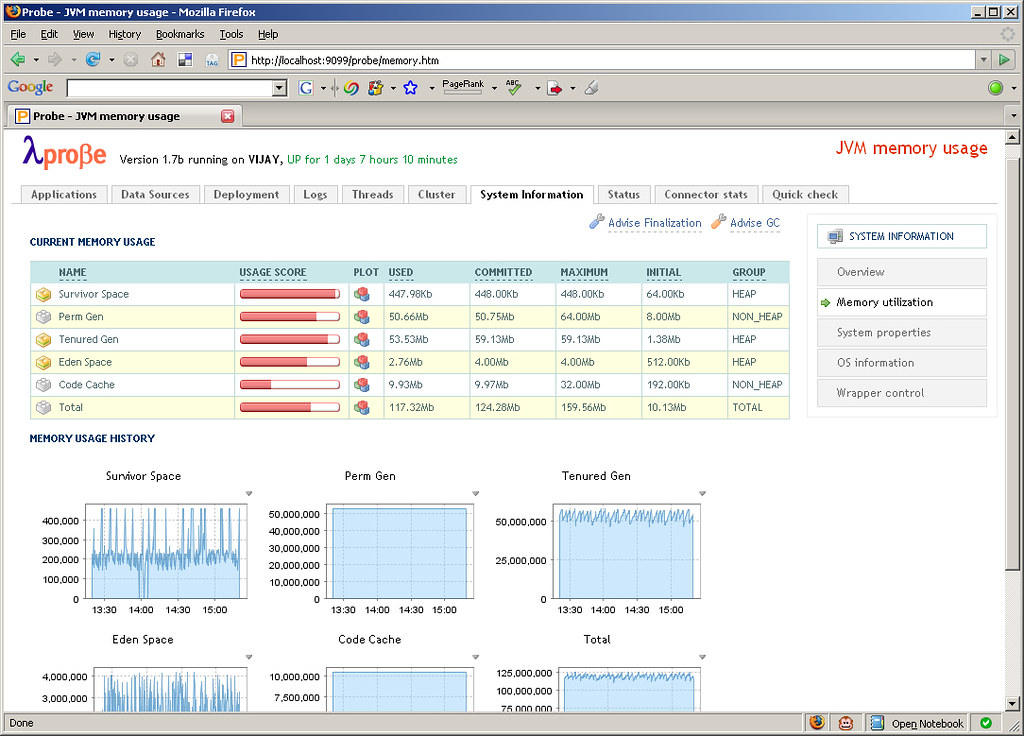
Apache Tomcat is arguably the most popular servlet container in use today. It has a well-established user base and is usually one of the first to implement new Servlet and JSP JSR specifications. Tomcat comes bundled with the Manager App that allows to perform management tasks such as deployment, reloading etc. of webapps and other related services. The Manager App also provides an interface for integration with Ant and in the future there are plans to also provide a web service interface. The browser-based interface is functional but seems a little lacking especially for monitoring the Tomcat and JVM runtime. This space has been neatly filled by an open source project called Lambda Probe. Lambda Probe installs as just another web application under Tomcat and provides a clean, simple visual interface for core administration and monitoring.

Along with performing the usual tasks such as listing, deploying, reloading and un-deploying webapps, Lambda Probe provides comprehensive system monitoring information, JMX integration to monitor memory usage, connector stats for HTTP requests made and clustering information. Another useful feature is browsing the Tomcat log files which can be tailed in real time. Lambda Probe also provides an Availability Quick Check. Quick check is an instant way of checking the availability of the Tomcat server against three primary parameters: data source availability, free memory availability and file creation capability.

Thursday, June 14, 2007

Displaying Javadocs in Subversion

Javadocs are an essential component of any Java project. It is a convenient way for a developer to gain an understanding of the API and the prescribed ways to use it. This is especially true when hosting open source projects on Google Code or Sourceforge. Subversion is increasingly used as a revision control system to host source code and other project related artifacts. Google Code uses Subversion exclusively while Sourceforge provides it as an option. At times, for the convenience of hosting and to centralize resources it may be required to host the Javadocs in Subversion and access them via a browser. When using Eclipse as the IDE, connecting to a Subversion server is simple through the Subclipse plugin.

On successfully committing the Javadocs to the server and viewing the exported pages through a browser, we notice that the pages display in text and are not rendered as normal HTML pages by the browser (Screenshot). The reason behind this is that the MIME type for the pages is set to text/plain and must be changed to text/html. This can be achieved through the Eclipse UI by applying the MIME type to the svn:mime-type property on the root directory of the Javadocs. The Set property recursively option must be checked to ensure that all the pages under subdirectories are also updated with the correct type.

The last change is to update the MIME type of stylesheet.css to text/css. The Javadocs in Subversion can now be viewed successfully through a browser (Screenshot).

Tuesday, June 05, 2007

URLPing - A Java Utility to Ping a URL

Recently there was a need at work to programmatically check the status of a URL. The requirement was to test if a specified URL returned a HTTP Status Code 200 OK or otherwise. URLPing, the utility that I wrote has been hosted on Google Code and is available for download and reuse. The utility uses the Apache Jakarta Commons HttpClient component.

URLPing is the main class. This class provides two methods ping(String url) and ping(String url, int timeout). The first method accepts a URL to ping and defaults to a timeout of 30 seconds. The second method accepts a timeout interval in seconds in addition to the URL to ping.

URLPing urlPing = new URLPing();
PingResponse pingResponse = urlPing.ping("http://www.techvj.com");
        
assertEquals(pingResponse.getResponseStatus(), ResponseStatus.OKAY);

The response to the ping method is a PingReponse object. This contains a ResponseStatus enum with values of either OKAY, ERROR or TIMEOUT depending on the outcome of the ping. It also contains a responseCode property which contains the response code of the HTTP request.

Google Calendar Error Page

Don't come across Google products crashing very often, however this morning my Google Calendar instance crashed with a 'Server Error'. Well, Google Calendar is still in Beta and this is the first time it has crashed on me. I found the error page very interesting. It contained the same error message in 18 languages! Now that denotes an app with true internationalization...

Thursday, April 26, 2007

Long-running Processes with Spring DAO and Hibernate

Spring and Hibernate are increasingly used together in Java web applications. Spring is used as the MVC and dependency-injection framework and also provides support for data access, transaction management etc. Hibernate is usually used alongside Spring as the object-relational mapping framework. Spring's support for Hibernate is impressive through it's DAO templating mechanism. This truly simplifies matters as all the routine infrastructure plumbing code is taken care of by Spring.

Spring intercepts requests made to the webapp and through dependency-injection makes objects available in order to fulfil the request. This includes creating the Hibernate Session object used by the DAOs. The Session object is lightweight and created and destroyed for every request. Hibernate sessions are not threadsafe and should be used by only one thread at a time. In order to keep the session open throughout the lifetime of a request we tie it to the view. This is done either by using Spring's OpenSessionInViewInterceptor or OpenSessionInViewFilter as below:

<bean id="openSessionInViewInterceptor" 
    class="org.springframework.orm.hibernate3.support.OpenSessionInViewInterceptor">
    <property name="sessionFactory" ref="sessionFactory" />
    <property name="flushModeName" value="Flush_AUTO" />
</bean>

<bean id="sessionFactory" class="org.springframework.orm.hibernate3.LocalSessionFactoryBean">
    <property name="dataSource" ref="dataSource" />
    ...
</bean>

<bean id="dataSource" class="org.apache.commons.dbcp.BasicDataSource">
    ...
</bean>

Most requests are synchronous and completed before the response is returned to the client. However, in the case of long-running processes, a new thread is created for execution of the process. The response is returned back to the client and the process runs independently on the server. Hibernate sessions obtained through OpenSessionInViewInterceptor are no longer available to the process as they are closed once the view has returned. This throws a LazyInitializationException complaining that the owning session was closed.

The problem can be overcome by directly accessing the Hibernate SessionFactory bean and binding the session to the long-running process thread. Hence the session is available and open within the thread itself. The UML diagram below describes our objects.

TestController is the Controller class that handles the request. Since it implements the ServletContextAware interface, Spring automatically passes the ServletContext object to it. This is used to obtain the ApplicationContext object. Next we create an instance of our LongProcessInvoker class, pass ApplicationContext to it and finally start execution using an Executor.

// TestController.java
public ModelAndView handleRequest(HttpServletRequest request, HttpServletResponse response) {
    try {
        ApplicationContext ac = 
            WebApplicationContextUtils.getRequiredWebApplicationContext(servletContext);
            
        LongProcessInvoker lpi = new LongProcessInvoker();
        lpi.setApplicationContext(ac);
            
        Executor ex = Executors.newSingleThreadExecutor();
        ex.execute(lpi);
    }
    catch(...) {
        ...
    }
}

In LongProcessInvoker we obtain the Session using SessionFactoryUtils and bind it to the current thread. Next the long running process is invoked and once complete we execute some clean-up code by releasing and closing the Session.

// LongProcessInvoker.java
public void run() {
    try {
        // Bind session object. 
        SessionFactory sessionFactory = 
            (SessionFactory) applicationContext.getBean("sessionFactory");
        Session session = SessionFactoryUtils.getSession(sessionFactory, true);
        TransactionSynchronizationManager.bindResource(sessionFactory, new SessionHolder(session));        
        
        LongProcess lp = (LongProcess) applicationContext.getBean("longProcess");
        lp.runLongProcess();
        
        // Release session object.
        session.flush();
        TransactionSynchronizationManager.unbindResource(sessionFactory);
        SessionFactoryUtils.closeSession(session);
    }
    catch(...) {
        ...
    }
}

Using the above approach, we can now run long-running processes by obtaining the Hibernate session outside the view.
Thursday, April 12, 2007

Loading Log4j Properties in Webapps on Tomcat

Log4j is a well established and widely used logging framework for the Java platform. At the core of Log4j lies a configuration file that allows to finely configure the logging requirements for an application. Currently, the configuration file is either a XML or Java properties file. The documentation states that this configuration file should be present in the classpath of the application. This works fine for most situations however causes problems within webapps on Tomcat.

The Log4j FAQ describes this due the way in which JavaEE and Servlet containers utilize Java's class loading system.

The problem can be overcome by using Log4j's PropertyConfigurator. PropertyConfigurator enables to statically load the configuration from an external file. Using the configure(String configFilename) method we can manually specify the path to the properties file within the webapp. We can tie this code into a ServletContextListener's contextInitialized(ServletContextEvent sce) event to force the properties file to be loaded at webapp startup.
Our ServletContextListener implementation is listed below:

import javax.servlet.ServletContextEvent;
import javax.servlet.ServletContextListener;
import org.apache.log4j.PropertyConfigurator;

public class ServletContextListenerImpl implements ServletContextListener {
    public void contextDestroyed(ServletContextEvent sce) {

    }

    public void contextInitialized(ServletContextEvent sce) {
        String path="WEB-INF/classes/log4j.properties";
        ServletContext context = sce.getServletContext();
        PropertyConfigurator.configure(context.getRealPath(path));
    }
}

Our Log4j properties file should now be successfully loaded when the webapp is initialized.

Friday, March 30, 2007

Secure Email Attachments with TrueCrypt

Digital documents have finally come of age. We now increasingly receive our bank statements, insurance quotes and receipts as digital files such as Word or PDF. Also, there is often a need to attach these documents to an email. Securing these attachments in transit over the Internet is an immediate concern. There are a number of solutions available such as Hushmail, a secure free email provider and PGP Desktop Email, a commercial email encryption product. The solution that I discuss here is based on a free, open-source encryption software called Truecrypt.

Truecrypt makes using bullet-proof encryption really easy through the concept of virtual encrypted disks. Each disk is stored as a single encrypted file and can be mounted as a real disk. Once mounted, it can be used as a local drive on the system. Entire hard-drives or USB memory sticks can be encrypted as well. Volumes can be protected using a password or through key files. Any file on the system can be used as a key file as an alternative or in addition to using a password. The key file or sequence of key files is required to encrypt and decrypt the disk.

The concept of key files makes using Truecrypt really valuable while sending sensitive attachments over email. In addition to using a password, if the sender and the receiver agree on a common file or a sequence of files that are uniquely present on both systems such as digital photographs or video clips, the encryption can be made highly secure. Hence the encrypted attachments are useless if intercepted during transit without the key files.

Truecrypt is extremely simple to use and hence there is just no excuse for not securing confidential files on storage or in transit.