Thursday, January 14, 2016

Setting Up A Proxy For The Atom Text Editor

Atom is an excellent open source text editor that I have switched to recently. Atom requires a network connection to update itself, install packages etc. This usually just works out-of-the-box.

However, if you are behind a proxy server, the proxy settings for Atom can be specified as below. Run the commands below at the OS's command line.

Specify The Proxy Server In Atom

Verify The Proxy Server Specified In Atom

Saturday, January 19, 2013

A Super Quick Start To Git

Git is a distributed version control system. This post is helpful to someone who would like to get quickly started with Git. Once up and running with the commands below, the reader is encouraged to follow-up with the comprehensive documentation on Git available from many excellent online sources. This will help to grasp the core concepts of Git, which are essential for regular use.

Note that this post only covers operations on a local repository. Distributed operations like cloning, pulling, pushing etc. will be covered in a future post.

Quick Git Concepts

  • Git is fully-functional and self-contained with just a local repository. Committing, branching, merging etc. can all be performed locally with no requirement for a central server.
  • Branching and merging are light-weight and extremely fast (local) operations.
  • The (hidden) .git directory within the root of working directory is fully self-contained. Git maintains the entire repository that includes information of all of the branches, commits etc. in this single directory.

Initial Setup

Git embeds the user name and e-mail address in every commit. This configuration is required before we can commit to the repository.

Create A New Repository

Initialises a new Git repository in the current directory. A single .git directory is created in the current directory where Git maintains the repository information.

Add Files To The Staging Area

Add specified files to the staging area. Wildcards can be used (e.g. *.java). Note that staged files need to be explicitly committed to the repository.

Adds any modified files previously committed and also any new files to the staging area.

Check The Current Status Of The Repository

Returns the current status of the repository. This is helpful to see the status of files that are in the staging area but not yet committed.

Commit Staged Files Into The Repository

Branching And Merging

Branching and merging are extremely light-weight operations in Git. In fact, it is even possible, if required to branch and merge several times a day. The root in Git is known as the Master branch. An important point to note is that only a single branch can be checked-out in the working directory at a given moment.

List All Of The Branches In The Repository

Create And Switch To A New Branch

Switch To An Existing Branch

Merging Branches

Merges the specified branch into the current branch.

Deleting A Branch

Note that you cannot delete the branch that is currently checked-out.

Tuesday, March 15, 2011

Messaging With WebSphere MQ Using Spring JMS

Spring JMS provides a simple API to work with JMS implementations. This post describes how to use Spring JMS to communicate with IBM WebSphere MQ. The code has been tested with WebSphere MQ version 7.0.1. Maven is used as the build tool. It is also used to resolve the WebSphere MQ and other dependencies. Only relevant code snippets are listed below - for the complete source, please refer to the link at the bottom of this post.

To start off we need to obtain the WebSphere MQ JARs. These JARs are proprietary - hence they will not resolve through a public Maven repository like Maven Central. These JARs need to be obtained from the WebSphere MQ installation directory and manually deployed to our local Maven repository. The config below defines the WebSphere MQ dependencies in our Maven POM file.

Spring's JMSTemplate class is the key to simplifying access to the conventional JMS API. It abstracts the common and repetitive boiler-plate code by handling the creation and closing of connections and sessions, sending and receiving of messages and handling of exceptions. JMSTemplate and a few other beans need to be defined in our Spring config.

MQQueueConnectionFactory defines the connection to the Queue Manager. Next we define SingleConnectionFactory102, DynamicDestinationResolver and finally JmsTemplate102. The 102 suffix implies that our underlying JMS implementation version is 1.0.2. Now that our configuration is complete, we can send and receive JMS messages.

To send a JMS message, we use the send(String destinationName, MessageCreator creator) method of JMSTemplate.

To receive a message, we use the receive(String destinationName) method.

As we can see, Spring's JMSTemplate really simplifies and speeds-up connecting to a JMS provider like WebSphere MQ.

Sample Source Code
A fully functional example Maven application accompanies this post. It provides the complete source code mentioned in this post. It can be downloaded at GitHub using the link below.

Monday, January 19, 2009

Live and Die with jQuery

jQuery is a JavaScript library that makes web programming simple and highly productive. With the new 1.3 release, jQuery now supports live and die events. To understand live and die events, we must recollect how things were done before the 1.3 release. To bind events to elements we used jQuery's bind method.

$("input:type=button").bind("click", function() {
    alert($(this).val());
});

The code above binds the click event to all buttons on the page. However, there is one major drawback to using the bind method. Any buttons dynamically added to the page in the future must be individually bound with the click event. Hence, bind only works on the set of elements currently in the DOM.

live overcomes this drawback and binds to elements currently present and also ones added in the future. The syntax for live is similar to bind. The code below binds the click event to all buttons currently on the page and even ones added in the future.

$("input:type=button").live("click", function() {
   alert($(this).val());
});

die is the opposite of live. To unbind all events previously bound with live we use the die method.

$("input:type=button").die("click");

Wednesday, April 09, 2008

Advanced Filtering in GMail

GMail provides filters and labels that are an effective way to organize and access the huge number of emails that we receive everyday.

Recently I came across another feature of GMail that takes filtering of email to a whole new level. Every GMail address can be suffixed with a + followed by some text. E.g. john@gmail.com can be aliased as john+family@gmail.com, john+facebook@gmail.com or john+cv@gmail.com. All of the aliased mail gets sent to the primary account (john@gmail.com). This opens up whole new possibilities for powerful filtering.

Take for example the email address you provide on your CV or at a job search website. At times when you are actively looking for a new job, these emails are highly important. During other times, you might not want your Inbox to be cluttered with job notifications. This can be easily handled using GMail email aliases. Simply provide john+cv@gmail.com (or john+123@gmail.com if you wish to be discrete) when signing up at a job search website and on your CV. Next setup a GMail filter that looks for emails sent to john+cv@gmail.com and either flags them for your attention or at other times automatically deletes them!

Email rules and filters have existed for a long time but GMail aliases take this to a whole new level. The possibilities (of email suffixes) are indeed endless!

Thursday, March 20, 2008

Apache Ivy

Almost all Java projects, apart from the most trivial ones have dependencies. These dependencies could either be on other projects or third-party libraries. Managing these dependencies can be extremely time-consuming and distracting from the primary focus of the project. Apache Ivy is a tool for managing library dependencies. Ivy neatly fills the gap by providing an easily configurable and automated dependency management system. Further, Ivy supports transitive dependencies management. Hence all we need to do is declare our main dependencies and Ivy automatically fetches all the sub dependencies along with the main dependencies from a public location such as the Maven 2 repository.

Installation

Ivy is designed to work with Ant, wherein Ant is used to run the build tasks and Ivy is used to resolve, retrieve and manage the dependencies. The simplest way to get started is to copy the Ivy jar file to the Ant lib (ANT_HOME/lib) directory.

Configure ivy.xml

The ivy.xml configuration file is the main file that is used to describe our dependencies. Below is an example of a configuration file that states two main dependencies, Hibernate and the C3P0 library.
<ivy-module version="2.0">
    <info organisation="techvj" module="ivy-test" />
    <dependencies>
        <dependency org="org.hibernate" name="hibernate" rev="3.2.6.ga" />
        <dependency org="c3p0" name="c3p0" rev="0.9.1.2" />
    </dependencies>
</ivy-module>

Integrate With Ant

The final step is to integrate the Ivy dependency resolution process with our Ant build process. Following is an example of a build.xml file with the retrieve task defined:
<project xmlns:ivy="antlib:org.apache.ivy.ant" name="hello-ivy" default="retrieve">
    ...
    <target name="retrieve" description="">
        <ivy:retrieve />
    </target>
</project>

On running the above Ant build, Ivy retrieves the Hibernate and C3P0 libraries and all of their dependencies to the local machine. The retrieved libraries are stored in a cache and not downloaded again on successive invocations. Apache Ivy is a great tool in a Java developer's toolbox for managing library dependencies.

Wednesday, March 19, 2008

Wicked Shell for Eclipse

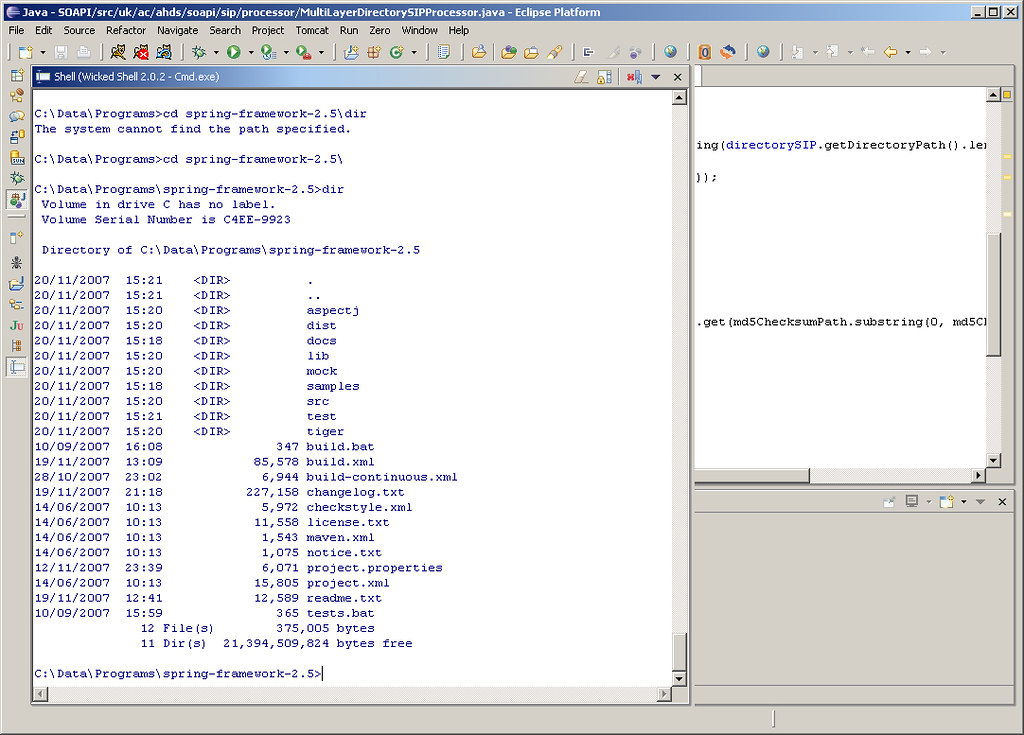
An Eclipse plug-in that I have begun to regularly use is Wicked Shell. Wicked Shell provides direct access to the operating system's shell (Cmd, Bash, SH etc.). In fact it is not an actual shell, it only acts as a window to the underlying shell using a SWT text widget to transfer commands and display output. The result is having an Eclipse view that behaves as a shell.

As with any Eclipse view that is regularly accessed, I would suggest setting up a shortcut key binding for Wicked Shell. On my installation I chose Alt+Shift+Q, S as the combination did not conflict with other pre-set bindings.

Monday, November 12, 2007

Perfect Paper Passwords - Two-Factor Authentication for the Masses

Usernames and passwords have long been established as the de facto form of authentication for websites and other systems. They provide a convenient system for authenticating and identifying users. However, they are also highly vulnerable to dictionary attacks, weak passwords, key-loggers etc. Recently, two-factor authentication has been suggested as providing a much stronger approach. In addition to 'Something You Know', such as a password, you also provide 'Something You Have', such as a security token. Verisign and RSA Security offer such products that produce a time-synchronized sequence of digits that change at regular intervals. Systems that incorporate these security token mechanisms, accept the sequence of digits in addition to a password during authentication.

Steve Gibson from GRC recently released a similar system based on passcodes. The Perfect Paper Passwords system produces a set of one-time passcodes. The passcodes are created using a 256-bit Sequence Key passed through a Rijndael/AES Cipher. The passcodes are then grouped into credit card sized passcards across 7 columns and 10 rows. During authentication, the system would prompt the user to enter the passcode at a particular column-row location (e.g. A3, D8 etc.). Since the passcards can be printed on paper it is an inexpensive, simple and highly-effective method of providing two-factor authentication.

The system has been released freely for public use and there are a number of language specific implementations already in place. Based on the sheer number of possible combinations, the PPP system is 16.77 times more secure than the token based systems by Verisign and RSA Security!

Friday, November 02, 2007

Quick Access in Eclipse

Any software developer using an IDE begins to truly appreciate keyboard shortcut keys to make the coding process more seamless. Eclipse has a rich set of keyboard shortcuts for almost every task and view. Ctrl+Shift+L produces a list of all available keyboard shortcuts. Remembering these key combinations for regular tasks is fairly simple, however we often recollect the task to be performed or the view to be opened without knowing the keys to be pressed.

Eclipse 3.3 M7 introduced a new feature called Quick Access (Ctrl+3). With Quick Access, UI elements such as commands, views, wizards, preference pages etc. can be quickly listed and filtered through. Ctrl+3 or Window -> Navigation -> Quick Access from the menu brings up the Quick Access dialog. On typing in the filter field, the list dynamically filters to display relevant matches. Using the arrow keys, the desired option can be selected and executed.

The next time Quick Access is opened, previous choices made will be remembered and initially displayed. Further, the filter automatically lists previous choices made across different key sequences at the top. Quick Access has now become my Swiss Army Knife while using Eclipse for development.

Friday, September 28, 2007

Best of Open Source in Platforms and Middleware

Being a software developer, I have truly begun to appreciate the benefits that my organization receives from Open Source software. This is especially true of middleware which consists of the meat of our IT infrastructure. Right from our Java EE application servers to our Web Services stack, the choice and quality of middleware available is truly phenomenal.

Infoworld recently announced the 2007 BOSSIE Awards for the Best of open source in platforms and middleware. I was glad to see JBoss and MySQL picking up awards - two products that I use every single day.

Sunday, September 09, 2007

Project Blackbox

Project Blackbox was launched around a year ago by Sun Microsystems. It is promoted as a mobile data center built into a 20' shipping container. The goal behind Project Blackbox is to provide a significantly powerful and capable data center that can be easily configured and deployed to varied and extreme locations. It is an interesting product and can be seen to fit into a number of scenarios where a traditional brick-and-mortar data center would not be feasible.

The Project Blackbox website has interesting information on the product. The video of the Earthquake Test of magnitude 6.7 is particularly impressive. I hope to soon spot black shipping containers with the Sun logo on rooftops all over our city.

Sunday, August 12, 2007

Memory Monitoring on Security Now

Security Now is a weekly podcast that focuses on the topic of computer security. I am a regular listener to the show and received a rather pleasant surprise to find a question that I had posted to the podcast being discussed.

I often like to track usage of memory (RAM) on my Windows machine. The tool that I usually use is the built-in Process List monitor (activated using Ctrl-Alt-Del). However, I was wondering if there was a more user-friendly app, possibly with a graphical view displaying memory usage by applications and processes. Hence I posted the question to Security Now. Below is the transcript of the question being discussed by Steve Gibson and Leo Laporte on Security Now Episode 104.

...

LEO: That’s the problem is that it’s all, you know, it’s international. You know, it’s tough because we’re an international podcast. For instance, Vijay Albuquerque in London - or it could be Vijay London in Albuquerque, doesn’t matter - now has plenty of room on his drive. He says: Dear Steve and Leo, after hearing about SpaceMonger, which by the way, Steve, I’ve been recommending everywhere, the original free version...

STEVE: Yup, it’s so nice.

LEO: I just recommended it on the radio show last weekend. He says: I’ve reclaimed virtually gigabytes of data from my hard drive. It gives you a visual display of what’s wasting space on your hard drive, makes it easier to get rid of it. He says: Is there something for memory, for RAM? He’s using the process monitor. You hit Ctrl-Alt-Del to get the Task Manager, and then you can click Processes and see the list of processes. But there must be a simpler, friendlier tool out there, something like SpaceMonger for RAM. I like it.

STEVE: RAM Monger or something, yeah. Well, it was an interesting question, so I wanted to explain that, you know, RAM is an entirely different animal than hard drive space because it is inherently dynamic. So applications which are running will use differing amounts of RAM, but there’s really no way to tell an application to stop using that much memory unless it’s a sloppy application that, for example, you could have a photo editing program where you edit a big photo which takes up a whole bunch of memory, and then when you close that photo it doesn’t release the memory, for example. So it’s possible that you could have apps which are misbehaving and essentially leaking memory.

But thankfully all Windows versions for the last decade have cleaned up the so-called "resource leaks" when the application terminates and freed up anything, any resources that they had allocated. So really just terminating processes, if you can, that is, if you don’t need them around, that are using up a lot of memory, will release their memory. But there isn’t anything that you could run to really clean up memory. There are some sort of hokey programs that are supposed to optimize your RAM. But they’ve really got a bad reputation. And really just, if you have this problem, just restarting Windows and getting things going again is the way to clear everything out.

LEO: In the old days of Windows 95, 98, and ME, the memory manager was pretty pathetic, and so you would have fragmentation of RAM, and you’d have some issues. But XP’s memory manager is fine, and there’s no point in compacting RAM.

STEVE: Right, right.

LEO: I think the memory manager does a pretty good job of getting rid of unused blocks. It can’t solve a memory leak, but nothing can solve it. If the operating system won’t get rid of that block, you know, release the block, no program’s going to come along and do it. So...

STEVE: Right.

...

Tuesday, July 24, 2007

Lambda Probe - Manage Tomcat with Simplicity

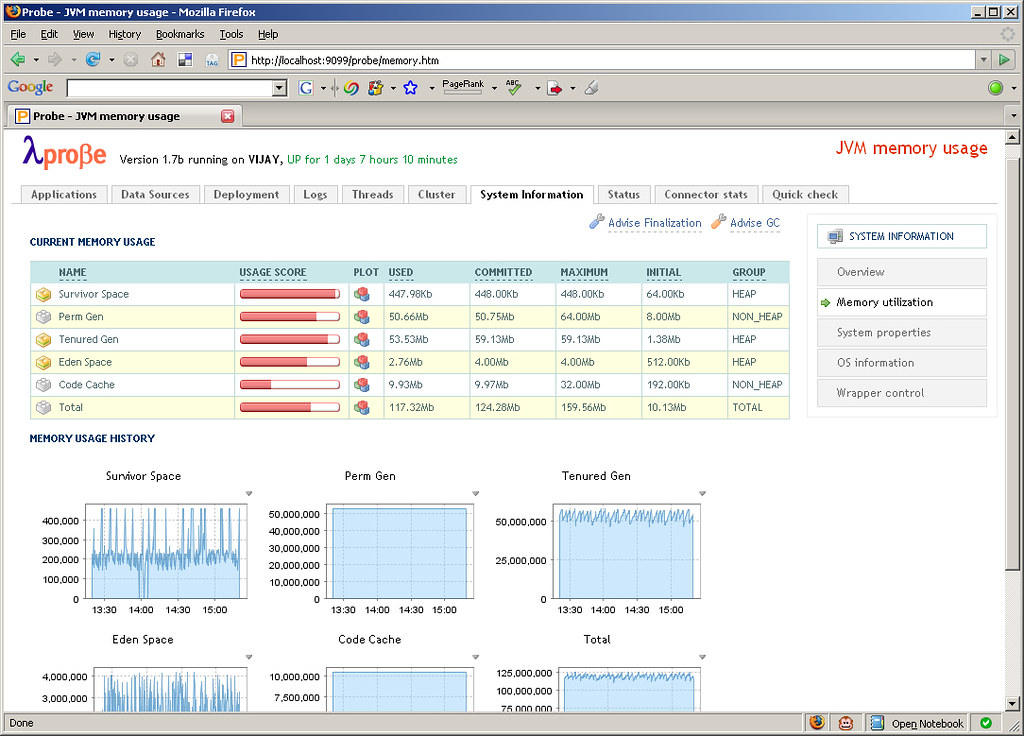
Apache Tomcat is arguably the most popular servlet container in use today. It has a well-established user base and is usually one of the first to implement new Servlet and JSP JSR specifications. Tomcat comes bundled with the Manager App that allows to perform management tasks such as deployment, reloading etc. of webapps and other related services. The Manager App also provides an interface for integration with Ant and in the future there are plans to also provide a web service interface. The browser-based interface is functional but seems a little lacking especially for monitoring the Tomcat and JVM runtime. This space has been neatly filled by an open source project called Lambda Probe. Lambda Probe installs as just another web application under Tomcat and provides a clean, simple visual interface for core administration and monitoring.

Along with performing the usual tasks such as listing, deploying, reloading and un-deploying webapps, Lambda Probe provides comprehensive system monitoring information, JMX integration to monitor memory usage, connector stats for HTTP requests made and clustering information. Another useful feature is browsing the Tomcat log files which can be tailed in real time. Lambda Probe also provides an Availability Quick Check. Quick check is an instant way of checking the availability of the Tomcat server against three primary parameters: data source availability, free memory availability and file creation capability.

Thursday, June 14, 2007

Displaying Javadocs in Subversion

Javadocs are an essential component of any Java project. It is a convenient way for a developer to gain an understanding of the API and the prescribed ways to use it. This is especially true when hosting open source projects on Google Code or Sourceforge. Subversion is increasingly used as a revision control system to host source code and other project related artifacts. Google Code uses Subversion exclusively while Sourceforge provides it as an option. At times, for the convenience of hosting and to centralize resources it may be required to host the Javadocs in Subversion and access them via a browser. When using Eclipse as the IDE, connecting to a Subversion server is simple through the Subclipse plugin.

On successfully committing the Javadocs to the server and viewing the exported pages through a browser, we notice that the pages display in text and are not rendered as normal HTML pages by the browser (Screenshot). The reason behind this is that the MIME type for the pages is set to text/plain and must be changed to text/html. This can be achieved through the Eclipse UI by applying the MIME type to the svn:mime-type property on the root directory of the Javadocs. The Set property recursively option must be checked to ensure that all the pages under subdirectories are also updated with the correct type.

The last change is to update the MIME type of stylesheet.css to text/css. The Javadocs in Subversion can now be viewed successfully through a browser (Screenshot).

Tuesday, June 05, 2007

URLPing - A Java Utility to Ping a URL

Recently there was a need at work to programmatically check the status of a URL. The requirement was to test if a specified URL returned a HTTP Status Code 200 OK or otherwise. URLPing, the utility that I wrote has been hosted on Google Code and is available for download and reuse. The utility uses the Apache Jakarta Commons HttpClient component.

URLPing is the main class. This class provides two methods ping(String url) and ping(String url, int timeout). The first method accepts a URL to ping and defaults to a timeout of 30 seconds. The second method accepts a timeout interval in seconds in addition to the URL to ping.

URLPing urlPing = new URLPing();
PingResponse pingResponse = urlPing.ping("http://www.techvj.com");
        
assertEquals(pingResponse.getResponseStatus(), ResponseStatus.OKAY);

The response to the ping method is a PingReponse object. This contains a ResponseStatus enum with values of either OKAY, ERROR or TIMEOUT depending on the outcome of the ping. It also contains a responseCode property which contains the response code of the HTTP request.

Google Calendar Error Page

Don't come across Google products crashing very often, however this morning my Google Calendar instance crashed with a 'Server Error'. Well, Google Calendar is still in Beta and this is the first time it has crashed on me. I found the error page very interesting. It contained the same error message in 18 languages! Now that denotes an app with true internationalization...

Thursday, April 26, 2007

Long-running Processes with Spring DAO and Hibernate

Spring and Hibernate are increasingly used together in Java web applications. Spring is used as the MVC and dependency-injection framework and also provides support for data access, transaction management etc. Hibernate is usually used alongside Spring as the object-relational mapping framework. Spring's support for Hibernate is impressive through it's DAO templating mechanism. This truly simplifies matters as all the routine infrastructure plumbing code is taken care of by Spring.

Spring intercepts requests made to the webapp and through dependency-injection makes objects available in order to fulfil the request. This includes creating the Hibernate Session object used by the DAOs. The Session object is lightweight and created and destroyed for every request. Hibernate sessions are not threadsafe and should be used by only one thread at a time. In order to keep the session open throughout the lifetime of a request we tie it to the view. This is done either by using Spring's OpenSessionInViewInterceptor or OpenSessionInViewFilter as below:

<bean id="openSessionInViewInterceptor" 
    class="org.springframework.orm.hibernate3.support.OpenSessionInViewInterceptor">
    <property name="sessionFactory" ref="sessionFactory" />
    <property name="flushModeName" value="Flush_AUTO" />
</bean>

<bean id="sessionFactory" class="org.springframework.orm.hibernate3.LocalSessionFactoryBean">
    <property name="dataSource" ref="dataSource" />
    ...
</bean>

<bean id="dataSource" class="org.apache.commons.dbcp.BasicDataSource">
    ...
</bean>

Most requests are synchronous and completed before the response is returned to the client. However, in the case of long-running processes, a new thread is created for execution of the process. The response is returned back to the client and the process runs independently on the server. Hibernate sessions obtained through OpenSessionInViewInterceptor are no longer available to the process as they are closed once the view has returned. This throws a LazyInitializationException complaining that the owning session was closed.

The problem can be overcome by directly accessing the Hibernate SessionFactory bean and binding the session to the long-running process thread. Hence the session is available and open within the thread itself. The UML diagram below describes our objects.

TestController is the Controller class that handles the request. Since it implements the ServletContextAware interface, Spring automatically passes the ServletContext object to it. This is used to obtain the ApplicationContext object. Next we create an instance of our LongProcessInvoker class, pass ApplicationContext to it and finally start execution using an Executor.

// TestController.java
public ModelAndView handleRequest(HttpServletRequest request, HttpServletResponse response) {
    try {
        ApplicationContext ac = 
            WebApplicationContextUtils.getRequiredWebApplicationContext(servletContext);
            
        LongProcessInvoker lpi = new LongProcessInvoker();
        lpi.setApplicationContext(ac);
            
        Executor ex = Executors.newSingleThreadExecutor();
        ex.execute(lpi);
    }
    catch(...) {
        ...
    }
}

In LongProcessInvoker we obtain the Session using SessionFactoryUtils and bind it to the current thread. Next the long running process is invoked and once complete we execute some clean-up code by releasing and closing the Session.

// LongProcessInvoker.java
public void run() {
    try {
        // Bind session object. 
        SessionFactory sessionFactory = 
            (SessionFactory) applicationContext.getBean("sessionFactory");
        Session session = SessionFactoryUtils.getSession(sessionFactory, true);
        TransactionSynchronizationManager.bindResource(sessionFactory, new SessionHolder(session));        
        
        LongProcess lp = (LongProcess) applicationContext.getBean("longProcess");
        lp.runLongProcess();
        
        // Release session object.
        session.flush();
        TransactionSynchronizationManager.unbindResource(sessionFactory);
        SessionFactoryUtils.closeSession(session);
    }
    catch(...) {
        ...
    }
}

Using the above approach, we can now run long-running processes by obtaining the Hibernate session outside the view.

Thursday, April 12, 2007

Loading Log4j Properties in Webapps on Tomcat

Log4j is a well established and widely used logging framework for the Java platform. At the core of Log4j lies a configuration file that allows to finely configure the logging requirements for an application. Currently, the configuration file is either a XML or Java properties file. The documentation states that this configuration file should be present in the classpath of the application. This works fine for most situations however causes problems within webapps on Tomcat.

The Log4j FAQ describes this due the way in which JavaEE and Servlet containers utilize Java's class loading system.

The problem can be overcome by using Log4j's PropertyConfigurator. PropertyConfigurator enables to statically load the configuration from an external file. Using the configure(String configFilename) method we can manually specify the path to the properties file within the webapp. We can tie this code into a ServletContextListener's contextInitialized(ServletContextEvent sce) event to force the properties file to be loaded at webapp startup.
Our ServletContextListener implementation is listed below:

import javax.servlet.ServletContextEvent;
import javax.servlet.ServletContextListener;
import org.apache.log4j.PropertyConfigurator;

public class ServletContextListenerImpl implements ServletContextListener {
    public void contextDestroyed(ServletContextEvent sce) {

    }

    public void contextInitialized(ServletContextEvent sce) {
        String path="WEB-INF/classes/log4j.properties";
        ServletContext context = sce.getServletContext();
        PropertyConfigurator.configure(context.getRealPath(path));
    }
}

Our Log4j properties file should now be successfully loaded when the webapp is initialized.

Friday, March 30, 2007

Secure Email Attachments with TrueCrypt

Digital documents have finally come of age. We now increasingly receive our bank statements, insurance quotes and receipts as digital files such as Word or PDF. Also, there is often a need to attach these documents to an email. Securing these attachments in transit over the Internet is an immediate concern. There are a number of solutions available such as Hushmail, a secure free email provider and PGP Desktop Email, a commercial email encryption product. The solution that I discuss here is based on a free, open-source encryption software called Truecrypt.

Truecrypt makes using bullet-proof encryption really easy through the concept of virtual encrypted disks. Each disk is stored as a single encrypted file and can be mounted as a real disk. Once mounted, it can be used as a local drive on the system. Entire hard-drives or USB memory sticks can be encrypted as well. Volumes can be protected using a password or through key files. Any file on the system can be used as a key file as an alternative or in addition to using a password. The key file or sequence of key files is required to encrypt and decrypt the disk.

The concept of key files makes using Truecrypt really valuable while sending sensitive attachments over email. In addition to using a password, if the sender and the receiver agree on a common file or a sequence of files that are uniquely present on both systems such as digital photographs or video clips, the encryption can be made highly secure. Hence the encrypted attachments are useless if intercepted during transit without the key files.

Truecrypt is extremely simple to use and hence there is just no excuse for not securing confidential files on storage or in transit.

Saturday, November 18, 2006

Windows Vista - Features Under the Hood

Windows Vista introduces some promising new features that aim to take desktop computing to the next level. Apart from all the eye-candy that is provided by the new Aero interface, gadgets and flip effects, there are some pretty neat features on offer under the hood. Some of these add improvements to the performance, security and productivity of the system.

Below are some of the features that I am really looking forward to in Vista.

ReadyBoost
Memory is usually one of the bottlenecks that affects system performance. As applications and background processes like anti-virus scans and drive indexing run concurrently, processor cycles and memory space are increasingly consumed. The result can be a drastic degradation in system performance. It would be great if memory could be added on the fly, providing extra space to ease the burden. Vista's ReadyBoost does just that.

With ReadyBoost, a USB memory drive with at least 512 MB of space can be plugged into the system and used by Vista as memory. The drive can be plugged out at any time without affecting or corrupting the system. Even more, all data on the drive is encrypted and hence is of no use to a malicious attack. With 2GB+ memory drives available today, this seems like a very promising technology.

BitLocker
Security of data is a primary concern these days to businesses and individuals alike. Regular reports of data theft, especially from notebook computers being stolen fuels our concerns. BitLocker is a technology that adds real-time data encryption to the Operating System volume. Hence lost or decommissioned computers are protected from data theft.

BitLocker which is available in the higher-end versions of Vista has some system prerequisites. A TPM (Trusted Platform Module), a cryptographic hardware chip needs to be present in the system. In the absence of a TPM, a USB stick that contains a startup key must be inserted at boot time.

ReadyDrive
Another new feature that exploits the latest developments in hardware is ReadyDrive. ReadyDrive makes use of hybrid hard drives, the latest hard drives that integrate non-volatile flash memory with traditional drives. This helps Windows to boot faster, resume from hibernation quicker and save on battery power. Finally the long wait for the boot process will be rather short!