Thursday, March 20, 2008

Apache Ivy

Almost all Java projects, apart from the most trivial ones have dependencies. These dependencies could either be on other projects or third-party libraries. Managing these dependencies can be extremely time-consuming and distracting from the primary focus of the project. Apache Ivy is a tool for managing library dependencies. Ivy neatly fills the gap by providing an easily configurable and automated dependency management system. Further, Ivy supports transitive dependencies management. Hence all we need to do is declare our main dependencies and Ivy automatically fetches all the sub dependencies along with the main dependencies from a public location such as the Maven 2 repository.

Installation

Ivy is designed to work with Ant, wherein Ant is used to run the build tasks and Ivy is used to resolve, retrieve and manage the dependencies. The simplest way to get started is to copy the Ivy jar file to the Ant lib (ANT_HOME/lib) directory.

Configure ivy.xml

The ivy.xml configuration file is the main file that is used to describe our dependencies. Below is an example of a configuration file that states two main dependencies, Hibernate and the C3P0 library.
<ivy-module version="2.0">
    <info organisation="techvj" module="ivy-test" />
    <dependencies>
        <dependency org="org.hibernate" name="hibernate" rev="3.2.6.ga" />
        <dependency org="c3p0" name="c3p0" rev="0.9.1.2" />
    </dependencies>
</ivy-module>

Integrate With Ant

The final step is to integrate the Ivy dependency resolution process with our Ant build process. Following is an example of a build.xml file with the retrieve task defined:
<project xmlns:ivy="antlib:org.apache.ivy.ant" name="hello-ivy" default="retrieve">
    ...
    <target name="retrieve" description="">
        <ivy:retrieve />
    </target>
</project>

On running the above Ant build, Ivy retrieves the Hibernate and C3P0 libraries and all of their dependencies to the local machine. The retrieved libraries are stored in a cache and not downloaded again on successive invocations. Apache Ivy is a great tool in a Java developer's toolbox for managing library dependencies.

Wednesday, March 19, 2008

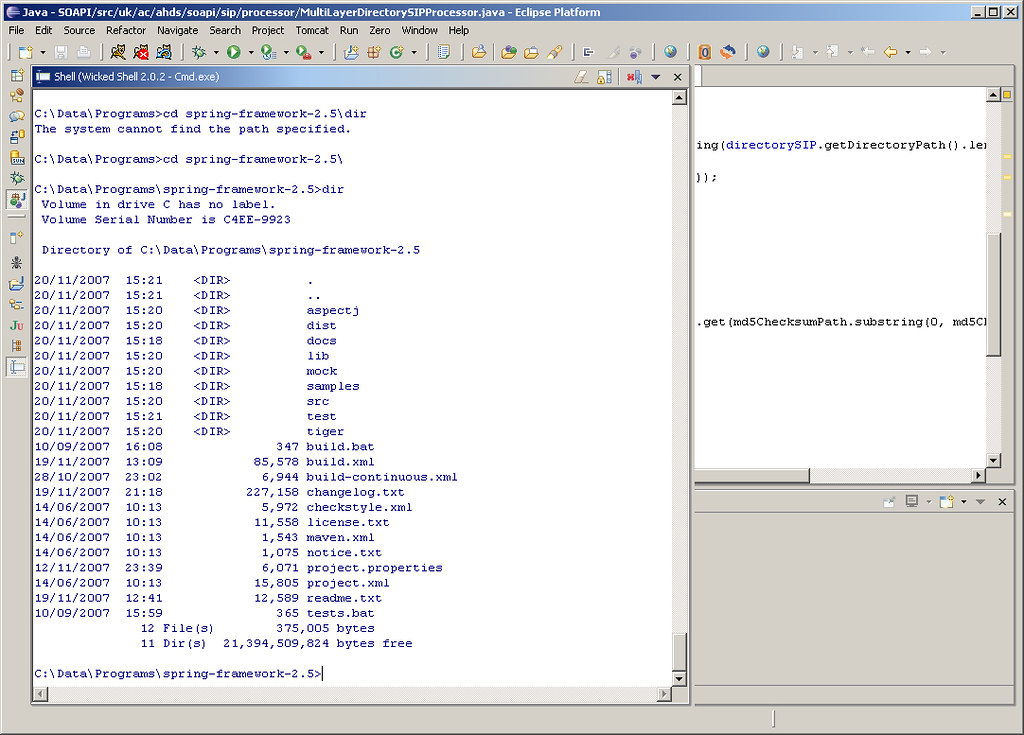
Wicked Shell for Eclipse

An Eclipse plug-in that I have begun to regularly use is Wicked Shell. Wicked Shell provides direct access to the operating system's shell (Cmd, Bash, SH etc.). In fact it is not an actual shell, it only acts as a window to the underlying shell using a SWT text widget to transfer commands and display output. The result is having an Eclipse view that behaves as a shell.

As with any Eclipse view that is regularly accessed, I would suggest setting up a shortcut key binding for Wicked Shell. On my installation I chose Alt+Shift+Q, S as the combination did not conflict with other pre-set bindings.

Monday, November 12, 2007

Perfect Paper Passwords - Two-Factor Authentication for the Masses

Usernames and passwords have long been established as the de facto form of authentication for websites and other systems. They provide a convenient system for authenticating and identifying users. However, they are also highly vulnerable to dictionary attacks, weak passwords, key-loggers etc. Recently, two-factor authentication has been suggested as providing a much stronger approach. In addition to 'Something You Know', such as a password, you also provide 'Something You Have', such as a security token. Verisign and RSA Security offer such products that produce a time-synchronized sequence of digits that change at regular intervals. Systems that incorporate these security token mechanisms, accept the sequence of digits in addition to a password during authentication.

Steve Gibson from GRC recently released a similar system based on passcodes. The Perfect Paper Passwords system produces a set of one-time passcodes. The passcodes are created using a 256-bit Sequence Key passed through a Rijndael/AES Cipher. The passcodes are then grouped into credit card sized passcards across 7 columns and 10 rows. During authentication, the system would prompt the user to enter the passcode at a particular column-row location (e.g. A3, D8 etc.). Since the passcards can be printed on paper it is an inexpensive, simple and highly-effective method of providing two-factor authentication.

The system has been released freely for public use and there are a number of language specific implementations already in place. Based on the sheer number of possible combinations, the PPP system is 16.77 times more secure than the token based systems by Verisign and RSA Security!

Friday, November 02, 2007

Quick Access in Eclipse

Any software developer using an IDE begins to truly appreciate keyboard shortcut keys to make the coding process more seamless. Eclipse has a rich set of keyboard shortcuts for almost every task and view. Ctrl+Shift+L produces a list of all available keyboard shortcuts. Remembering these key combinations for regular tasks is fairly simple, however we often recollect the task to be performed or the view to be opened without knowing the keys to be pressed.

Eclipse 3.3 M7 introduced a new feature called Quick Access (Ctrl+3). With Quick Access, UI elements such as commands, views, wizards, preference pages etc. can be quickly listed and filtered through. Ctrl+3 or Window -> Navigation -> Quick Access from the menu brings up the Quick Access dialog. On typing in the filter field, the list dynamically filters to display relevant matches. Using the arrow keys, the desired option can be selected and executed.

The next time Quick Access is opened, previous choices made will be remembered and initially displayed. Further, the filter automatically lists previous choices made across different key sequences at the top. Quick Access has now become my Swiss Army Knife while using Eclipse for development.

Friday, September 28, 2007

Best of Open Source in Platforms and Middleware

Being a software developer, I have truly begun to appreciate the benefits that my organization receives from Open Source software. This is especially true of middleware which consists of the meat of our IT infrastructure. Right from our Java EE application servers to our Web Services stack, the choice and quality of middleware available is truly phenomenal.

Infoworld recently announced the 2007 BOSSIE Awards for the Best of open source in platforms and middleware. I was glad to see JBoss and MySQL picking up awards - two products that I use every single day.

Sunday, September 09, 2007

Project Blackbox

Project Blackbox was launched around a year ago by Sun Microsystems. It is promoted as a mobile data center built into a 20' shipping container. The goal behind Project Blackbox is to provide a significantly powerful and capable data center that can be easily configured and deployed to varied and extreme locations. It is an interesting product and can be seen to fit into a number of scenarios where a traditional brick-and-mortar data center would not be feasible.

The Project Blackbox website has interesting information on the product. The video of the Earthquake Test of magnitude 6.7 is particularly impressive. I hope to soon spot black shipping containers with the Sun logo on rooftops all over our city.

Sunday, August 12, 2007

Memory Monitoring on Security Now

Security Now is a weekly podcast that focuses on the topic of computer security. I am a regular listener to the show and received a rather pleasant surprise to find a question that I had posted to the podcast being discussed.

I often like to track usage of memory (RAM) on my Windows machine. The tool that I usually use is the built-in Process List monitor (activated using Ctrl-Alt-Del). However, I was wondering if there was a more user-friendly app, possibly with a graphical view displaying memory usage by applications and processes. Hence I posted the question to Security Now. Below is the transcript of the question being discussed by Steve Gibson and Leo Laporte on Security Now Episode 104.

...

LEO: That’s the problem is that it’s all, you know, it’s international. You know, it’s tough because we’re an international podcast. For instance, Vijay Albuquerque in London - or it could be Vijay London in Albuquerque, doesn’t matter - now has plenty of room on his drive. He says: Dear Steve and Leo, after hearing about SpaceMonger, which by the way, Steve, I’ve been recommending everywhere, the original free version...

STEVE: Yup, it’s so nice.

LEO: I just recommended it on the radio show last weekend. He says: I’ve reclaimed virtually gigabytes of data from my hard drive. It gives you a visual display of what’s wasting space on your hard drive, makes it easier to get rid of it. He says: Is there something for memory, for RAM? He’s using the process monitor. You hit Ctrl-Alt-Del to get the Task Manager, and then you can click Processes and see the list of processes. But there must be a simpler, friendlier tool out there, something like SpaceMonger for RAM. I like it.

STEVE: RAM Monger or something, yeah. Well, it was an interesting question, so I wanted to explain that, you know, RAM is an entirely different animal than hard drive space because it is inherently dynamic. So applications which are running will use differing amounts of RAM, but there’s really no way to tell an application to stop using that much memory unless it’s a sloppy application that, for example, you could have a photo editing program where you edit a big photo which takes up a whole bunch of memory, and then when you close that photo it doesn’t release the memory, for example. So it’s possible that you could have apps which are misbehaving and essentially leaking memory.

But thankfully all Windows versions for the last decade have cleaned up the so-called "resource leaks" when the application terminates and freed up anything, any resources that they had allocated. So really just terminating processes, if you can, that is, if you don’t need them around, that are using up a lot of memory, will release their memory. But there isn’t anything that you could run to really clean up memory. There are some sort of hokey programs that are supposed to optimize your RAM. But they’ve really got a bad reputation. And really just, if you have this problem, just restarting Windows and getting things going again is the way to clear everything out.

LEO: In the old days of Windows 95, 98, and ME, the memory manager was pretty pathetic, and so you would have fragmentation of RAM, and you’d have some issues. But XP’s memory manager is fine, and there’s no point in compacting RAM.

STEVE: Right, right.

LEO: I think the memory manager does a pretty good job of getting rid of unused blocks. It can’t solve a memory leak, but nothing can solve it. If the operating system won’t get rid of that block, you know, release the block, no program’s going to come along and do it. So...

STEVE: Right.

...